In one sentence
When a document is revised, a small triangle appears in the left margin next to every section that actually changed — tagged with the version that changed it — and clicking one opens that section's diff, so a reader can go straight to what moved instead of re-reading the whole SOP.
- Markers point at real changes, section by section. Each ▲ sits beside a heading that changed in a substantive (minor or major) revision and shows the version number that changed it — e.g. ▲ 1.1. Click it to see the before/after for just that section.
- Patch revisions never mark sections. A spelling or formatting patch bumps the version without dropping a single marker — cosmetic fixes don't clutter the margin.
- The diff baseline is the last substantive version, not merely the previous one. So a grammar patch published between two real revisions doesn't wipe out the meaningful diff — you still see the change against the last version that mattered.
What a marker looks like
On an approved internal document, changed sections carry a small teal triangle (▲) in the left margin, just outside the body text, with the version number that introduced the change beside it. A section changed in the 1.1 revision reads ▲ 1.1; one changed again at 2.0 reads ▲ 2.0.
The markers are subtle by design — they don't reflow the document or interrupt reading. They're an at-a-glance answer to "what's new in this revision?" for anyone opening a document they've read before.
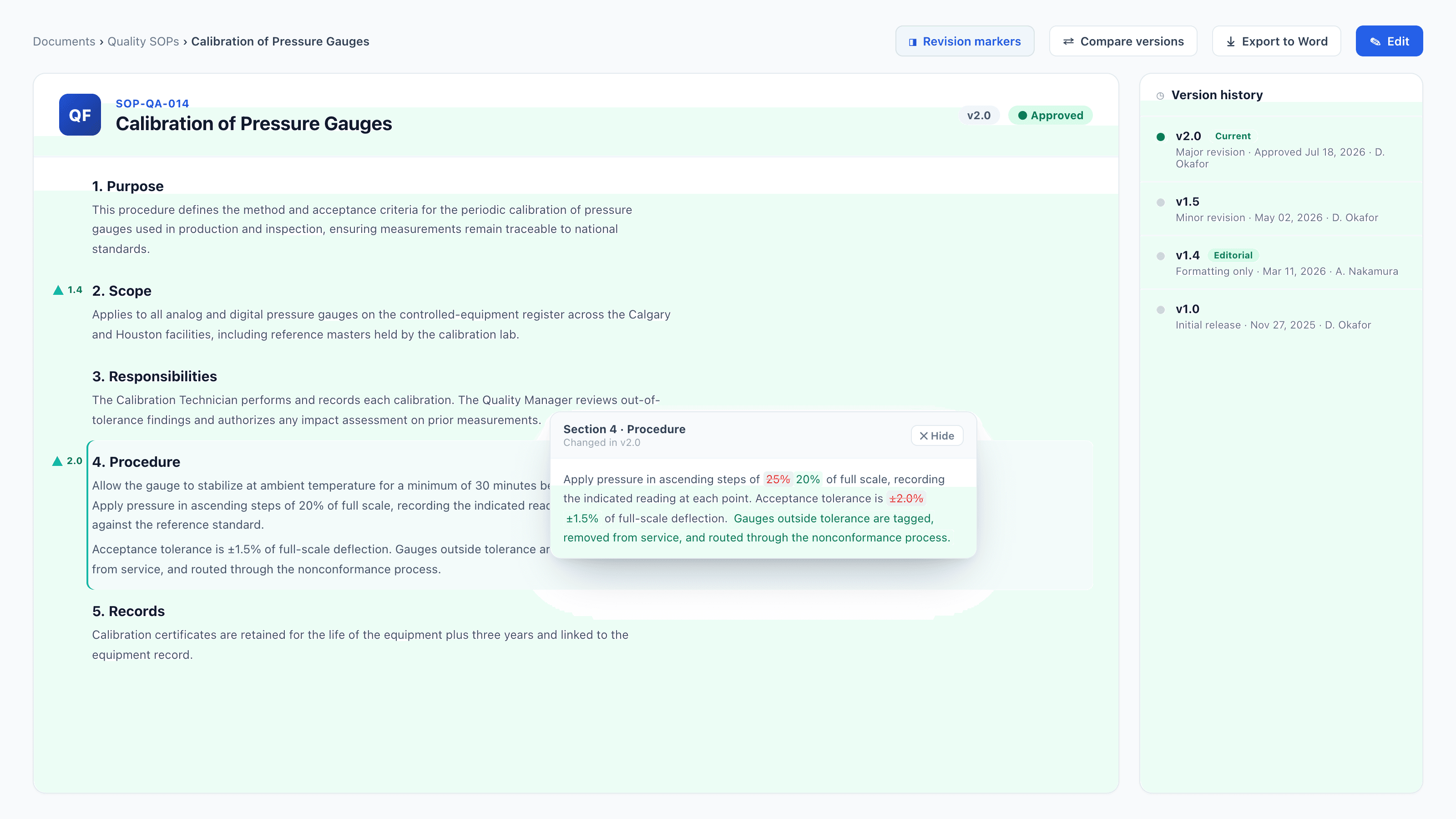
Teal ▲ markers flag the sections that changed — ▲ 1.4 on Scope, ▲ 2.0 on Procedure. Clicking the Procedure marker opens its section diff; the version history on the right tags the formatting-only 1.4 revision as Editorial.
Which revisions mark sections
Markers track substantive revisions only:
| Revision type | Marks sections? |
|---|---|
| Major (e.g. 1.4 → 2.0) | Yes — every section whose content changed gets a marker at the new version. |
| Minor (e.g. 1.3 → 1.4) | Yes — same as major. |
| Patch (spelling / grammar / formatting) | Never. The version bumps, but no markers are recorded. |
The first approved version (1.0) has nothing to compare against, so it carries no markers. Markers start appearing from the first real revision onward.
The editorial-only override
Sometimes a minor or major revision touches a lot of sections cosmetically — a renumbering pass, a reformat, a template migration — and marking every one of them would drown out the changes that matter. For that case, the submit-for-approval modal offers a checkbox:
Editorial only — no revision markers Bumps the version like any revision, but won't flag individual sections in the margin. Use for reformatting or renumbering that touches many sections cosmetically.
Tick it and the revision behaves like any other — the version bumps, a snapshot is written, distribution and acknowledgement fire per the chosen mode — but no per-section markers are recorded. The checkbox appears only on minor and major revisions (a patch already records nothing).
An editorial revision is labeled in version history with a small Editorial tag, so the audit trail shows plainly that the version bumped without flagging sections — hovering it reads "Editorial-only revision — no per-section markers were recorded."
Marking a revision editorial-only suppresses the margin markers; it does not change whether the version requires acknowledgement or a quiz. Those are set separately on the same submit modal. If a reformat genuinely doesn't need re-acknowledgement, set the ack mode to none — don't rely on the editorial flag to do it.
Clicking a marker — the section diff
Click any ▲ and a preview panel opens showing that one section's diff: the text as it was against the text as it is, with additions and removals highlighted inline. A Hide control collapses the diff back to the plain section.
The comparison runs against the last substantive version — the most recent minor or major revision, skipping any patch published since. That's the load-bearing detail:
Imagine v1.4 rewrote a procedure, then v1.4.1 fixed a typo in an unrelated paragraph. If the diff compared against the immediately previous version, opening the rewritten section after the typo patch would show almost nothing — the patch would have become the new baseline and erased the meaningful comparison. By anchoring to the last substantive version instead, the diff still shows the v1.4 rewrite in full. You always diff against the last version that actually meant something.
External documents show a banner instead
Markers are an HTML-document feature — they need headings and body text to anchor to and diff. External documents are opaque files (a PDF, a drawing) rendered in a viewer, so there's nothing to mark section-by-section. Instead, a revised external document shows a revision banner at the top of its detail page summarizing the change — the new revision, when it was approved, the revision it supersedes, and the author's change notes. See External documents → Revision banner.
Turning markers off org-wide
Revision markers are on by default for every organization. There's an org-level setting (show_revision_markers) that switches them off across the whole document library for orgs that would rather not surface them — when it's off, no triangles render and the section-diff click target goes away, but revisions, versions, and the approval trail are all completely unaffected.
▸
The setting lives on the org's org_document_config record and defaults to on (a missing config row is treated as on). There isn't a dedicated admin-page toggle for it yet — if you want markers disabled org-wide, raise it with support. Everything else about revisions works identically whether markers are shown or hidden.
Related
- Document approvals & versions — revision types, the editorial-only checkbox, version history, and diffs
- External documents — the revision banner external docs get instead of markers
- Document training & acknowledgements — the acknowledge-changes flow lists the same changed sections, each linking to its diff
- Documents — the register and document lifecycle